
An effective landing page can make all the difference for marketers looking to convert website visitors into leads and loyal customers. But though landing pages sound like a quick solution to low conversion rates, creating one from scratch can be challenging, even for the more experienced marketers.
You require extensive coding knowledge, design expertise, and a considerable investment of time that you probably don’t have. The process is also often error-prone and honestly unnecessarily laborious. The fact that you’re reading this post shows you understand just how frustrating it can all be.
Luckily you can always take the easier and more efficient road to streamline your landing page creation process – landing page builders.
Landing page builders help you quickly create landing pages that are not only compatible with your marketing tools but are also high-converting. Let us get to the ins and outs of a landing page builder and then continue to review the best landing page builders available on the market.
[TL;DR] The best tools to build your landing pages
We analyzed a bunch of landing page builders to create a short list of the ten best landing page builders. But before we get to the detailed breakdown of each tool, here’s a brief table listing each tool with its pros and cons:
| Landing page builder | Pros | Cons | Pricing |
|---|---|---|---|
| GetResponse | • Intuitive editor • AI generation • 1 million free stock photos. • Popup and forms builder | • Limited free plan • No A/B testing feature for landing pages | Free & paid ($19/mo+) |
| Unbounce | • AI-powered builder • A/B testing & analytics • Strong customer support | • No free plan • Expensive pricing • Steep learning curve | Paid ($29/mo+) |
| Moosend | • Drag-and-drop landing page builder • Ready-made templates for lead generation • Built-in AI writer to generate and refine landing page copy | • No native landing page A/B testing • Limited design flexibility • No heatmaps or session recordings | $9/month (Included in all Moosend’s plans) |
| Instapage | • Easy drag-and-drop • Fast load speeds | • Expensive pricing • Complex interface | Paid ($79/mo+) |
| Leadpages | • Easy drag-and-drop • Free custom domain • Built-in scheduling | • Limited design features • Few & outdated integrations • No multiuser access | Paid ($37/mo+) |
| Landingi | • Code customization • Free plan available | • Limited customization • Basic plan restrictions | Free & paid ($29/mo+) |
| ClickFunnels | • Intuitive drag-and-drop • Unlimited landing pages | • Limited templates • Expensive pricing • Support level depends on plan (e.g., “Standard Support” vs “Priority + Live Chat Support”) | Paid ($81/mo+) |
| Elementor | • Unlimited landing pages • Fast load speeds | • Steep learning curve • WordPress-only | Paid (from $49/year), and a free plugin is available |
| Wix | • Feature-rich • User-friendly | • Basic templates • Poor customer support | Free & Paid ($17+/mo) |
| Hubspot | • Multiple integrations • CRM compatibility | • Expensive pricing • Limited templates | Free & paid (Starter from $15/mo per seat) |
| Brizy | • Free forever plan • Affordable pricing | • Weak customer support | Free & Paid ($108/yr+) |
What is a landing page builder?
A landing page builder is a tool that allows you to create custom landing pages for your websites without necessarily having any coding knowledge. There are multiple builders in the market, both paid and free, that can be used to create a landing page. However, your choice is ultimately based on your specific needs and budget.
Most builders offer standard features like a landing page template library, drag-and-drop editor, and form builder. Others may offer additional or advanced features to enhance your customization options.
For instance, as we’ll see in the next section, some tools support A/B testing capabilities and integrate with third-party platforms. Moreover, platforms like GetResponse offer over 200 responsive landing page template designs. That’s more than you get from other tools like Unbounce and Wix.

Different landing page builders also have different pricing models, such as tiered pricing based on service or feature offerings. Therefore, you must compare various builders to ensure you choose a tool within your budget.
Moreover, some of these platforms are standalone landing page builders, offering powerful landing page features but nothing else. On the other hand, platforms like GetResponse and HubSpot provide a suite of marketing tools, with a landing page builder being one of them.
A dedicated landing page builder may be the better option if you just want to build landing pages. However, if you want a tool with more functionalities – list building, lead nurturing, paid ads, etc. – a versatile platform like GetResponse is best. Such a platform brings all the arsenal you’ll need for your marketing efforts under one roof.
1. GetResponse landing page builder
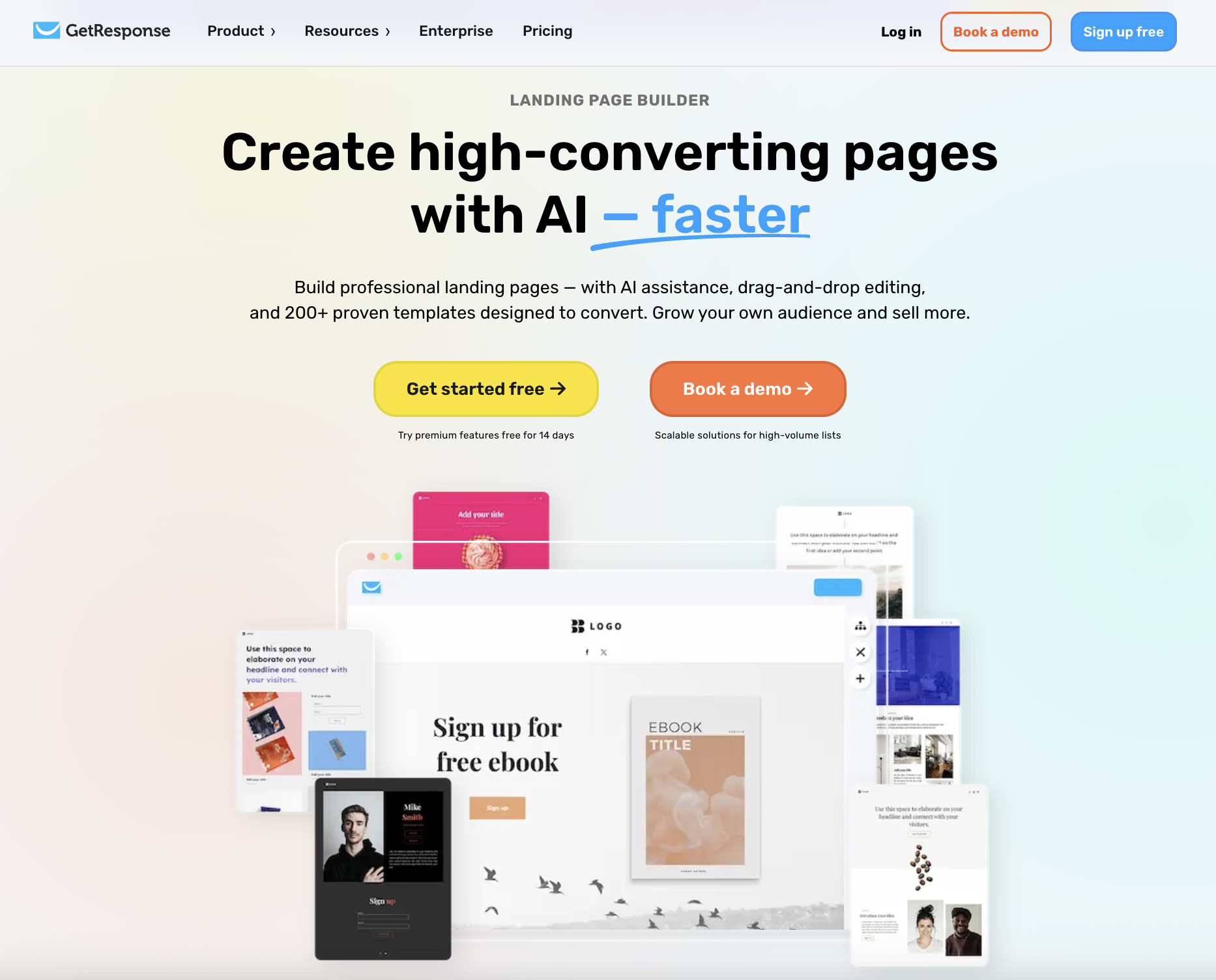
GetResponse is an email marketing software at its heart, but it also offers a range of other marketing and lead generation tools. These include forms and popups, webinars, paid ads, conversion funnels, and, most importantly – the GetResponse landing page builder.
We designed this tool to make building landing pages as straightforward as possible while giving you all the resources you need to create landing pages that convert. The results? Our platform has helped publish over 150,000 landing pages and generated $1 million worth of revenue for businesses just like yours.
Let’s look at the features that make the GetResponse landing page builder great.
Key features
The GetResponse landing page builder offers a variety of features to ensure you create landing pages that help you achieve your business and marketing goals. These include;
- In-built templates: GetResponse has a collection of over 200 responsive landing page templates. You can choose a template that aligns with your specific business goals from this diverse library. Additionally, you will have access to a free library of GIFs and 1 million free images from Unsplash to make your landing page stand out.
- Built-in drag-and-drop editor: We understand that you need to customize the templates to meet the unique needs of your target audience. The built-in drag-drop editor makes this a simple process. Simply drag and drop the blocks and elements of the template you like to create an effective landing page in minutes.
- AI-generative features: That’s right. You can have a custom-built website made just for you. Complete with images, copy, and layout.
- Free domain: The builder provides a free domain for publishing the landing pages to ensure your page appears in search engine results. You can also connect your existing domain (free of charge) if you wish to retain brand consistency.
- Analytics: You will have access to essential data on your landing page performance. This includes key insights into metrics like the number of visits, clicks, and conversions.
The GetResponse landing page builder integrates with other online tools – directly or via a custom code element – including Google Analytics, Google Tag Manager, and Facebook Pixel. This makes it easy to monitor and manage your custom landing pages on a single platform.
Pricing
GetResponse offers three payment plans tailored to different business needs and sizes, as shown below.
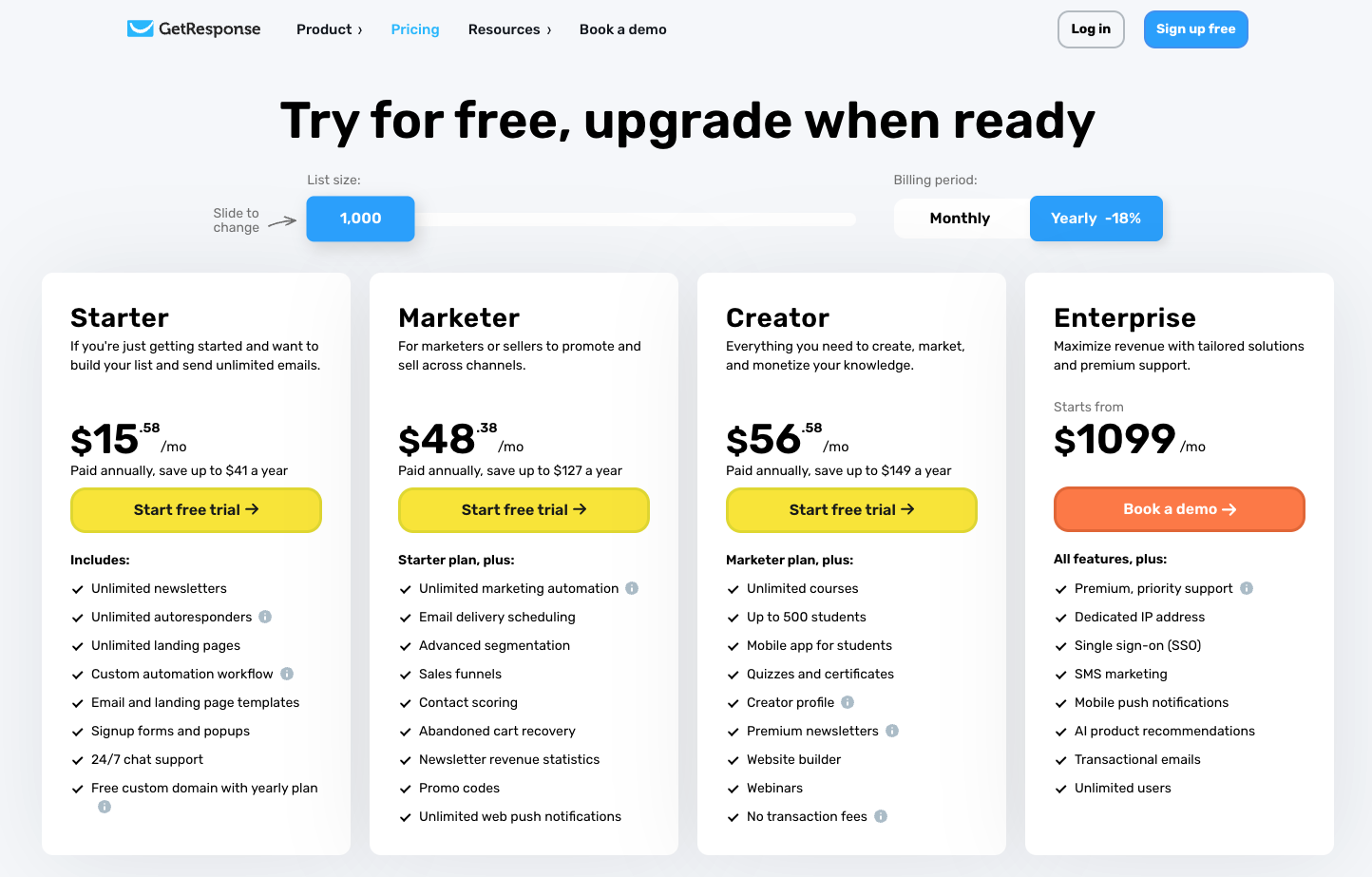
You can start by registering for the free plan to test our landing page builder features. But note that on the Free plan, you can create and publish one landing page and store up to 500 contacts. You’ll need to subscribe to our paid plans to create multiple landing pages with an unlimited number of visitors or enjoy our integration features.
Luckily, paid plans start from only $15/month. This allows you to enjoy additional services like list segmentation, automation, and sales funnel. We also have custom pricing plans that offer premium features and dedicated customer support.
💡 If you buy an annual plan, GetResponse applies an automatic 18% discount. You can also get a 50% discount if you’re a non-profit organization.
Pros & cons
Like any other platform, the GetResponse landing page builder has advantages and disadvantages.
| Pros | Cons |
|---|---|
| Intuitive editor: Most users have noted that the landing page editor is easy to use, making it the best choice for both beginners and experienced marketers. | The free plan only has limited features: For example, custom code, integrations, and analytics are only accessible to users in paid plans. |
| Unique features: Our builder offers a wide range of unique features compared to its counterparts, like AI generation, webinars, and over 2 million free stock photos. | No A/B testing: The current landing page builder does not support native split testing. But it can be done through third-party tools. |
| Additional marketing tools: Users also love GetResponse because they’ll have access to additional marketing tools they may need in the future. These include popup and forms builder, live chat, marketing automation tools, and more. |
2. Unbounce

Unbounce is one of the best landing page builders available on the market. The tool sets itself apart by offering AI-powered features that make it easy for anyone, despite their skill level, to build landing pages that’ll drive more conversions.

Key features
With Unbounce, users have two ways to build landing pages – the Classic Builder and the Smart Builder.
Classic builder
The classic builder uses the original drag-and-drop editor with advanced coding and customization options.

It offers a library of over 100 pre-designed templates that you can customize. If you understand basic JavaScript and CSS coding languages, the platform allows you to add, edit, and arrange your page’s elements as you desire.
You can also personalize content by employing dynamic text replacement, which will immediately modify the text to fit the ad your visitors clicked.
Smart builder
This is an AI-powered landing page builder. It offers data-backed recommendations to help you build your landing pages faster and more precisely.

The Smart Builder provides pre-optimized templates with instant copy generation and an assisted building experience. It provides an assisted, AI-powered building experience (with AI copywriting features available on paid plans) and is designed to help marketers build and optimize landing pages efficiently.
You will also have access to the Unbounce Apps library that helps you connect your favorite tools, like Shopify, PayPal, and Calendly, to your smart builder pages to boost functionality.
Pricing
Unfortunately, Unbounce does not have a free package. You only get a free trial, available across all plans.
Speaking of, Unbounce’s paid plans start with Starter at $29/mo (monthly billing). The Build plan starts at $99/mo.
That package also comes with limits. For example, the Build plan includes traffic volume up to 20k visitors (and some account limits like users/domains), while Unbounce lists unlimited conversions across plans.
To get a more robust package, you can move up from Build to Experiment or Optimize, or contact sales for Concierge/Agency plans (custom pricing). Here’s an overview of the main plans.
Unbounce’s Build plan (starting at $99/mo) includes unlimited pages and adds popups and sticky bars; higher tiers increase traffic/user/domain limits and add features like unlimited A/B testing (Experiment).
Pros & cons
| Pros | Cons |
|---|---|
| Smart Builder: uses AI-powered features to help users create high-converting landing pages. | Expensive: Unbounce landing page builder software doesn’t come with a free plan, and the paid ones can be expensive for some businesses. |
| A wide range of features: including A/B testing, analytics, and integration with other marketing tools. | Steep learning curve: Users have complained that the builder is not as beginner-friendly as other landing page builders. It requires more time to learn how to use it. |
| Decent customer support: users have mentioned that Unbounce offers great customer support. Those on the Concierge Plan even have a dedicated success manager. |
3. Moosend
Moosend features a landing page builder designed for businesses that want to create simple, conversion-focused landing pages quickly, without advanced technical requirements or enterprise-level pricing. The tool focuses on ease of use, clean design, plug-and-play landing page templates, making it a solid choice for SMBs and growing teams that prioritize speed over heavy experimentation.
Key features
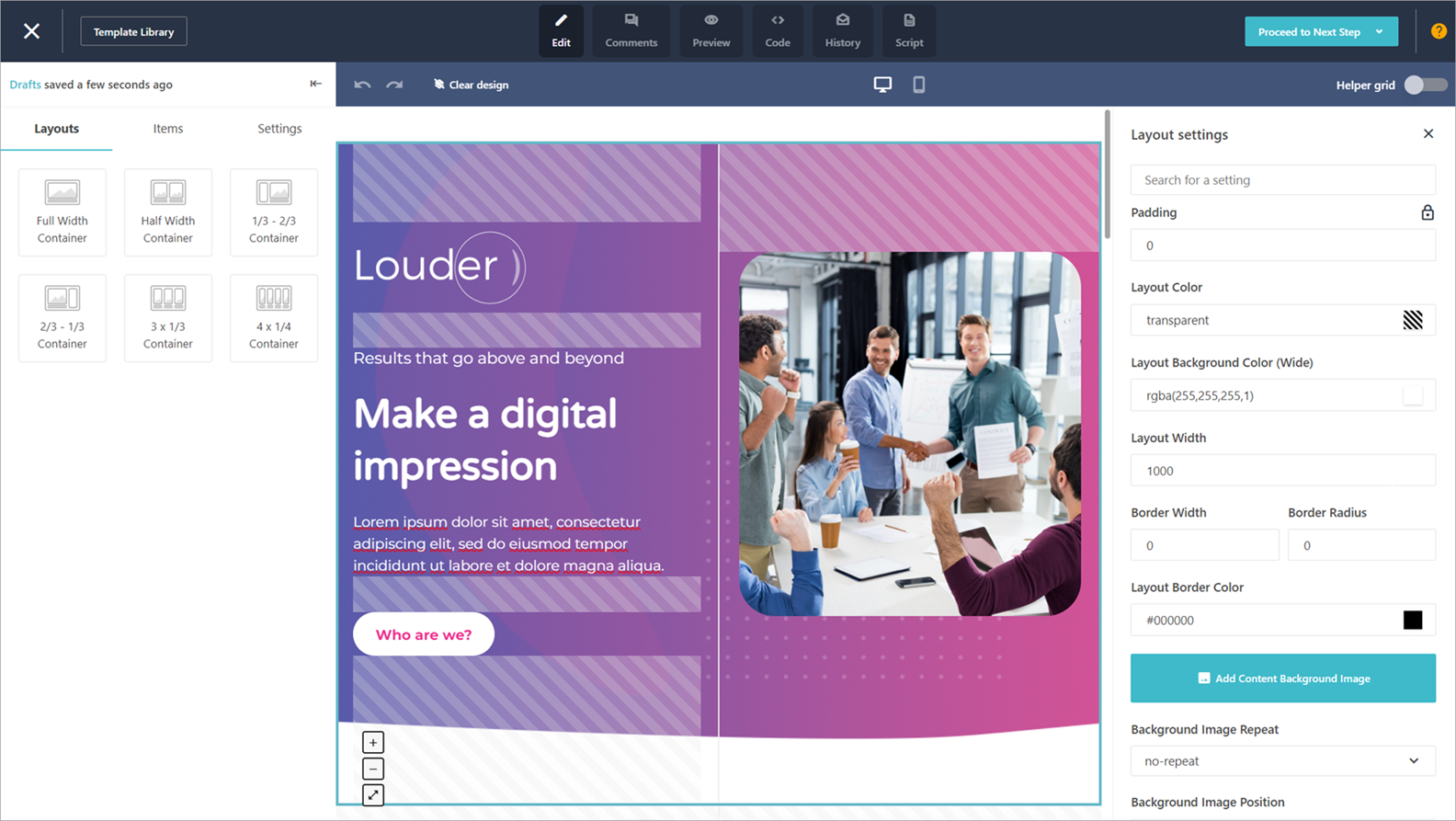
Moosend offers a simple, no-code landing page builder that emphasizes usability and fast deployment. The drag-and-drop editor allows users to structure pages visually and customize content blocks in real time. It is intentionally lightweight, making it easy for non-technical users to build pages without a steep learning curve.
Key features include:
- A library of designer-made, mobile-responsive templates tailored to common use cases such as lead generation, webinar registrations, and “coming soon” actions.
- A built-in AI writer that helps generate headlines, body text, and calls to action directly inside the builder.
- Custom conversion goals, such as form submissions or button clicks. Performance can be tracked using Moosend’s native analytics or connected to external tools like Google Analytics and Meta (Facebook) Pixel.
- Publishing flexibility. Your landing page can be published on a custom domain or embedded into a WordPress site using Moosend’s WordPress plugin
Pricing
Moosend does not offer a separate landing page builder plan, but landing pages are included in its paid subscriptions and free 30-day trial. Pricing starts at $9/month, with costs based on the number of unique contacts.
| Pros | Cons |
| Clean templates optimized for common conversion goalsIntuitive no-code landing page builderNo traffic-based or per-page pricingBuilt-in AI writer for landing page copyDesigned for fast page launches with minimal setup | Not built for advanced experimentation or CRO-heavy workflowsAnalytics focus on conversions, not user behaviorNo built-in testing framework for optimizing variations |
4. Instapage

Instapage is another awesome tool you can use to build landing pages. The platform’s functionality is built around enhancing customer experience, making it an ideal tool for creating landing pages that will boost conversions and customer engagement.

Key features
Some of Instapage’s key features include:
- Customizable landing page layouts: Instapage landing page builder offers 500+ customizable landing page layouts that you can easily edit to create a great custom landing page.
- Instablocks: These are custom blocks with common page elements like headers, footers, CTAs, testimonials, etc. You can create and save specific Instablocks to use them as a foundation for new pages. This makes creating and publishing a high volume of post-click landing pages easy.
This feature will not only scale your post-click landing page production but also save you a lot of time that you’d otherwise spend duplicating a well-performing template from scratch.
- Accelerated Mobile Pages (AMP): Instapage previously supported AMP pages, but it no longer supports creating, duplicating, or uploading AMPs (existing AMP pages remain live and editable). For new pages, use Instapage’s responsive mobile builder instead.
- Thor Render Engine: The back-end Thor Render Engine ensures faster-loading landing pages which helps you avoid losing leads due to slow page load time.

Additionally, Instapage’s AI creation feature, shown above, allows users to create personalized content with AI-generated headlines, paragraphs, and landing page calls-to-action.
Pricing
Instapage offers three plan tiers: Create, Optimize, and Convert (custom). This can be both a good and bad thing, depending on how you look at it. It may be good in that you don’t have to analyze too many options to figure out which package is right for you. On the flip side, it doesn’t give you too much freedom in determining which plan works best based on your budget and needs.
The plans are Create, Optimize, and Convert (custom):
Instapage seems more expensive than Unbounce if you just look at the prices. However, dig through the plans, and you’ll notice Instapage has a more compelling offer. For example, there are no conversion limits. You can also use unlimited domains. That makes it a great option if you’re hoping to generate lots of traffic and make tons of conversions on your landing page.
The Create plan is designed for most teams getting started, while Optimize adds higher limits and optimization-focused capabilities; Convert is custom for advanced needs. You can test it out with a 14-day free trial on the Create and Optimize plans.Meanwhile, enterprise companies will likely find Convert a better option.
Pros & cons
Pros
| Pros | Cons |
|---|---|
| Easy to create landing pages at scale: Instapage’s drag-and-drop editor and Instablocks make it easy to create and modify landing pages without any coding knowledge. | Expensive: the price range offered by Instapage landing page builder can be expensive for some businesses. |
| Fast landing pages: Landing pages created with the builder have high load speeds and are responsive. | Getting used to the interface takes time: the interface can be a little complicated, especially for beginners. |
5. Leadpages

Leadpages is a lead generation platform designed to help you attract qualified traffic and turn it into leads and customers. The platform helps you create various lead-generation tools, including landing pages, popup forms, and alert bars.

Key features
Here are some of Leadpages’ builder key features:
- Drag-and-drop builder: Leadpages offers a drag-and-drop editor to help you customize responsive pre-designed templates to create your own landing pages.
- Additional in-built editing features: The landing page editor also offers additional in-built features like a countdown timer, video player, Calendly schedule, and OpenTable reservation widget. These features improve the functionality of your landing pages and encourage leads to take action.
For instance, say you’re running a campaign to promote an upcoming webinar. You can use the video player feature to add informative video content about your event and use the countdown timer to create urgency that encourages web visitors to sign-up for your webinar.
You can also add the Calendly schedule and reservation widget features to your page. This will make it easier for interested leads to make bookings without leaving the page.
- A/B testing: The builder offers split testing to help you identify the landing page design elements that work best. Additionally, you can use their conversion guidance feature, which predicts a page’s performance before it’s published. This tool also offers relevant recommendations to optimize your page.
Leadpages supports integrations across CRMs, payments, and social platforms — including Salesforce (Integrated on Advanced plans), Stripe (Leadpages Checkouts), and Facebook (Compatible social widgets).
Pricing
Starting at $37/month on annual billing, Leadpages is one of the more affordable page builders on this list. This plan includes core lead-gen features like landing pages (Standard includes 5 landing pages), unlimited traffic & leads, the ability to connect 1 custom domain, and unlimited A/B testing. Higher tiers remove page limits and add more domain capacity.
You can start both plans with a limited free trial. There’s also the option to contact the team for a custom plan.
Pros & cons
| Pros | Cons |
|---|---|
| Easy to use: Leadpages has a drag-and-drop editor with additional features that make designing and customizing landing pages easier. | Limited advanced features: some users have noted that Leadpages lack advanced design features and functionalities like custom CSS. This can be an inconvenience for experienced marketers. |
| Free custom domain: Like GetResponse, Leadpages lets you connect your own domain at no extra cost. | Limited external integrations: users have complained that the integrations are either limited or outdated. |
| Built-in integrations, for reservations and scheduling meetings | Lack of multiuser access: Leadpages offers client sub-accounts, and advanced integrations/capabilities depend on the plan tier. |
6. Landingi

Landingi is another great landing page builder for businesses of all types that want to generate more leads.

Key features
Here are some of the features you’ll enjoy as a Landingi landing page builder user:
- Ready-made templates: Landingi offers 400+ landing page templates, allowing you to build a pixel-perfect landing page in minutes.
If you have coding skills and want to create your landing pages from scratch, Landingi provides a custom code feature you can use to make suitable changes.
- Funnel builder: Landingi has a landing page funnel builder. This will help you design and plan the entire user path, from the first stage, awareness, to when a lead finalizes an action.
This also makes it easy to segment your leads based on factors like traffic source, browsing patterns, and interests. It’ll also make it easy to identify the best-performing landing pages based on conversion rates.
Once a landing page is live, Landingi lets you track key metrics like page visits and conversions. A/B testing is available on higher-tier plans (e.g., plans that include Server Side A/B Testing).
Pricing
Landingi offers multiple plans. The Lite plan starts at $29/month (with limits like 10 active landing pages and 5,000 visits per month), and there’s also a Free plan with tighter limits. Although the Lite plan includes unlimited conversions, visits are capped at 5,000 per month.
Therefore, unless you’re creating a very niche landing page, the $49/month Professional plan is the most reasonable starting package.
Landingi’s Free plan now supports up to 5 active landing pages and 100 visits per month.
Pros & cons
| Pros | Cons |
|---|---|
| Customize with code: You can use the intuitive editor or add code to customize your landing page. | Limited basic plan: The basic plan lacks some essential features, like the ability to customize your landing page with custom HTML code. |
| Limited range of customization options: Even with the two customization options, users complain that Landingi does not let you fully customize your landing pages. | |
| Free plan: Like GetResponse, Landingi offers a free plan that lets you create your first landing page at zero cost |
7. Clickfunnels

Clickfunnels is mostly known for its sales funnel builder. Besides building marketing funnels, the platform also has a strong landing page builder.

Key features
Some of the key features of ClickFunnels (including its landing page tools) include:
- Drag-and-drop editor: Clickfunnels offers a drag-and-drop editor, allowing marketers to design and customize their landing pages in minutes easily.
You can also add your own CSS code if you have coding knowledge.
- Theme settings: With Clickfunnels, you don’t have to recreate every page. Once you define your theme settings, Clickfunnels will automatically carry them forward to any new pages you create.
- A/B testing: You can also A/B test your landing pages on Clickfunnels. These tests will help you identify the best-converting landing pages, which you can duplicate to maximize your ROI.
Clickfunnels supports external integrations with Stripe, Shopify, and Square to streamline functions like email marketing and payment processing.
Pricing
ClickFunnels offers multiple plans. The Launch plan is $81/mo billed annually (regularly $97/mo), and Scale is $164/mo billed annually (regularly $197/mo). Each pricing plan allows users to build Landing Pages app included (free in every plan).
Clickfunnels might be a great option if you’re also going to use the other funnel builder tools. Otherwise, if your sole purpose is to build a landing page, there might be other cheaper options.
Pros & cons
| Pros | Cons |
|---|---|
| Intuitive interface: Clickfunnels’ main pro is the intuitive drag-and-drop editor | Poor customer support: Some users have complained of poor and slow customer support. |
| Unlimited landing pages: the tool also lets you build unlimited landing pages. | Limited templates: The landing page templates library is fairly limited. |
| Quite expensive: Clickfunnels is pretty expensive compared to a tool like GetResponse, whose paid plans start at $15/mo. Check out this comparison guide on Clickfunnels and GetResponse for more details. |
Read more: Clickfunnels alternatives
8. Elementor

Of course, we couldn’t end this list without talking about Elementor, one of the most popular landing page builders among WordPress users.

Key features
Some of the features you’ll enjoy as an Elementor user include:
- Intuitive editor: Elementor has an intuitive visual editor and offers users access to hundreds of free responsive templates.
You can also expand the builder’s design capabilities with custom CSS.
- WordPress plug-in: The Elementor builder offers a WordPress page builder plugin built with lean and non-intrusive codes.
It also supports third-party add-ons and integrations to help you extend Elementor’s features and functionality. These include analytics & optimization tools, such as Google Analytics, Hotjar, and Optimizely, which help track visitor’s behavior.
Pricing
Elementor Pro offers four main plans (Essential, Advanced, Expert, and Agency), with pricing starting from $49/year. Elementor Pro plans share the core Pro feature set, and the main difference is the number of sites you can activate your license on. The only difference is in the number of websites you can build. The cheapest plan lets you build only 1 website.

Besides the paid plans, Elementor also provides a free page builder plugin. This is a great option if you want to build a basic landing page. But if you have coding skills, you may be able to use the free option to create a relatively robust page.
Pros & cons
| Pros | Cons |
|---|---|
| Unlimited landing pages: With Elementor, users enjoy unlimited landing pages on one platform without needing extra plugins or costs. | Learning curve: Users have noted that Elementor can be quite confusing for beginners. |
| Ensures optimal page load speed: The builder ensures your page has optimal speed and performance to reduce bounce rates. | Limited to WordPress: If you’re not a WordPress plan and would rather use a separate CMS, this might be a downside |
9. Wix

Wix is one of the most versatile builders you can use. Purchasing a Wix package offers access to not only a landing page builder but also a full marketing suite, website hosting, and a professional video maker.

Key features
Here are some of Wix’s landing page builder core features:
- Intuitive editor: Wix has an intuitive landing page tool like all the other builders. You can also save your high-converting landing page and use it as a template for future pages or client projects. This makes it easy to create landing pages at scale.
- Dedicated ecommerce landing pages: If you run an ecommerce store, Wix can help you build dedicated eCommerce landing pages to showcase new products, promote exclusive deals or optimize your sales funnel.
- Great integrations: Wix offers integrations with industry-leading marketing and analytics tools. These include Google Analytics and Google Tag Manager via Wix Marketing Integrations, and you can add other tools (e.g., Hotjar) via Google Tag Manager or custom code.
You can track performance with Wix Analytics, and you can add third-party analytics/optimization tools (including heatmaps and testing tools) via Marketing Integrations or Google Tag Manager to better understand visitor behavior and improve conversions.
Pricing
Wix offers a free plan, but it comes with various limitations. In particular, if you want to use a custom domain, you’ll need to upgrade to one of the paid plans, starting from $17/mo (with paid plans ranging up to $159/mo, depending on the tier). They also have a custom plan that will be personalized to match your specific business goals and needs.
Pros & cons
| Pros | Cons |
|---|---|
| Provides lots of features: Wix landing page builder offers a wide range of features to help you create high-converting landing pages, including templates, widgets, and a live preview. | Basic templates: some users have noted that Wix’s templates tend to be basic compared to other landing page builders. This means you might have to create your own landing page from scratch to include all the elements you want. |
| User-friendly: Wix layout is very user-friendly. |
10. Hubspot

Hubspot is known for its customer relationship management (CRM). However, the platform also offers a convenient landing page builder. That makes it a worthy option, especially if you already use the platform. However, the tool is not without its faults, which we’ll get to shortly.

Key features
HubSpot’s landing page builder offers the following features:
- An easy-to-use editor: Build landing pages on HubSpot quickly with the drag-and-drop editor and the library of mobile-optimized templates.
The editor also allows you to preview how your page looks before publishing to avoid design and content errors.
- Dynamic Content: Personalize landing page content for individuals by showing dynamic content based on a visitor’s location, device, lifecycle stage, or contact detail stored in the CRM.
This will enhance customers’ experience and leave your leads feeling valued since it shows you pay attention.
- A/B testing: HubSpot supports running A/B tests on pages (including landing pages), so you can compare variations and improve performance.
- AI-generative features: Breeze by HubSpot can generate landing pages from a prompt, producing suggestions for copy, images, forms, and meeting links.
Hubspot offers customized SEO suggestions on design elements such as your landing page content, headlines, and images based on your conversion metrics. These suggestions will help you optimize your landing pages with ease.
Pricing
Hubspot provides different payment plan categories based on company size and number of contacts.
Individuals and small teams can use the three plans shown below. HubSpot offers free tools to get started, and paid Starter pricing is seat-based. For example, Starter can be purchased for $15/month per seat (monthly) for the first year (promo), with an annual option shown on HubSpot’s Starter page.
However, sizable businesses and enterprises only have two pricing plans; the Professional Plan at $800/mo and the Enterprise Plan at $3600/mo.
Pros & cons
| Pros | Cons |
|---|---|
| Multiple integrations: Hubspot landing page builder’s main pro is its ability to integrate with various other marketing solutions, including its own CRM. This will help you provide your leads with a unified marketing experience. | Expensive: the HubSpot page builder is quite expensive for big businesses and enterprises. |
| Limited templates library: users have also complained about a limited templates library. |
11. Brizy

Brizy is the last platform in our review of the best landing page builders. This platform offers multiple features that you can easily take advantage of to boost your conversion rates and sales. Let’s take a look at those features.

Key features
Here are some of Brizy’s core features:
- Intuitive editor: Brizy has an intuitive editor to help you create clean landing pages in minutes. You’ll also have access to 100+ free customizable templates with a responsive design.
- High load speeds: The tool has a clean code to help you create fast landing pages to ensure excellent customer experiences.
- Pop-up builder: You will also enjoy free access to the pop-up builder, which will boost your lead-generation efforts.
The Brizy builder integrates with third-party tools like Google Analytics and Woocommerce.
Pricing
Brizy offers a flexible payment plan. Users can use the Free Forever Plan, but it’s very limiting. For instance, you will miss out on core features like premium premade layouts and blocks, popup builder, and marketing integrations.
So if you choose Brizy, you’ll eventually have to upgrade to the paid plans.
Brizy PRO (WordPress) plans range from $60/yr (Personal) to $300/yr (White Label), depending on how many websites you need and whether you want white-label features.
Pros & cons
| Pros | Cons |
|---|---|
| Free Forever: Brizy’s main pro to users is the Free Forever Plan. | Customer support: some users complained that the customer support could be better. |
| Affordable: Brizy is more affordable than most other landing page builders |
Frequently asked questions (FAQ)
What is the best platform to build a landing page?
The best landing page builder depends on what you’re trying to achieve and how much flexibility you need. If you want an all-in-one marketing platform (email marketing, automations, forms, and landing pages in one place), a suite like GetResponse or HubSpot can be a better fit. If you only need landing pages and optimization features like built-in testing, a dedicated builder like Unbounce, Instapage, Leadpages, or Landingi may make more sense. The fastest way to decide is to shortlist 2–3 tools, compare plan limits (traffic/visits, number of pages, domains, and A/B testing), and try a free plan or free trial.
How much does it cost to build a landing page?
Costs vary widely. Some platforms let you start for free (with limits), while most paid plans range from entry-level monthly subscriptions to higher-priced plans for teams that need more traffic, more domains, advanced analytics, or optimization features. Your final cost usually depends on factors like how many pages you need, expected traffic volume, whether you want A/B testing, and whether you need integrations or custom code.
Should I use a landing page builder?
Yes—most marketers benefit from using a landing page builder. Builders help you launch faster with templates and drag-and-drop editing, publish on a domain without extra development work, and measure results with built-in analytics or integrations. If you plan to run campaigns regularly (lead magnets, webinar signups, product launches, paid ads), a builder is usually the most practical way to build, test, and improve pages over time.
Final thoughts on landing page builders
Landing page builders provide an excellent way to create high-converting landing pages for organizations of all sizes. Unfortunately, the market has grown saturated with landing page builders, making it hard for marketers to choose.
Our list of the ten best landing page builders makes it easy to choose an option that will help you create professional-looking and high-converting landing pages. Remember, the best landing page builder will match your budget and also meet your specific landing page needs.
Now go ahead and choose the perfect landing page builder. All the best!
Author’s note: This comparison is accurate on February 11, 2026. We do our best to keep it as accurate as possible, and we check it on a regular basis, however, if you want to acquaint yourself with the offer of our competitors, you should check it at their official website or contact their representatives.
